
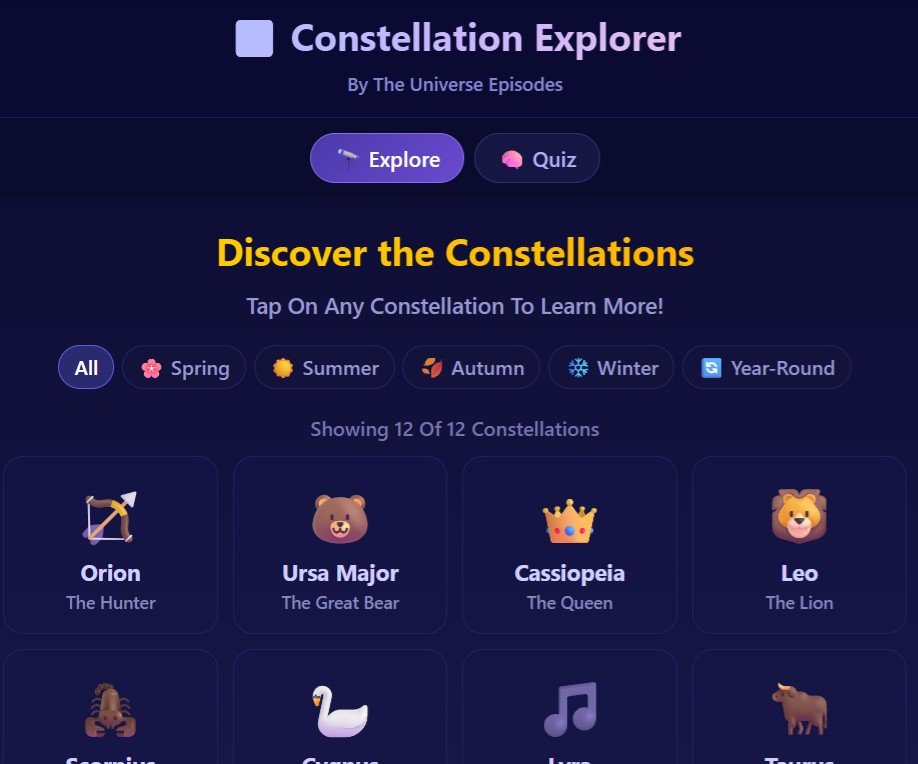
Have you ever looked up at the night sky and wondered which stars form which constellation? Our free Constellation Explorer lets you explore all 88 officially recognized constellations — no telescope, no account, no download required. Just open it and start exploring.
What Is the Constellation Explorer?
The Constellation Explorer is a free, interactive star guide built for curious minds of all ages. Whether you’re a first-time stargazer or a seasoned amateur astronomer, this tool helps you identify, learn, and quiz yourself on the constellations visible in our night sky.
There are 88 officially recognized constellations defined by the International Astronomical Union (IAU). Each one has a mythology, a shape, and a season when it’s easiest to spot. The Constellation Explorer puts all of them in your hands — organized by season and difficulty.
What You Can Do With It
- Explore all 88 constellations — filter by season (Spring, Summer, Autumn, Winter, Year-Round)
- Interactive Sky Map — zoom in/out, rotate, and find exactly where each constellation appears in the sky using the compass grid (N/S/E/W)
- Constellation Quiz — test your knowledge with an image-based quiz. Can you name them all?
- Stargazing difficulty ratings — each constellation is rated Easy, Medium, or Challenging so you know where to start
- Stargazing tips for beginners — practical advice on finding dark spots, adjusting your night vision, and using the North Star as your guide
V.1 vs V.2 — What’s the Difference?
V.2 is the latest version with a cleaner design, faster loading, and an improved sky map with zoom controls. V.1 (Classic) includes the original compass-based sky direction guide and detailed stargazing tips for kids — perfect for families exploring the night sky together. Both are completely free to use.
How to Use the Constellation Explorer
No setup required. Just click the button above and start exploring. Here’s a quick guide:
- Choose your season — tap Spring, Summer, Autumn, Winter, or Year-Round to see which constellations are visible right now
- Tap a constellation — click any constellation name or image to learn more about it
- Open the Sky Map — use the compass grid to find where the constellation appears in your sky tonight
- Take the Quiz — test yourself and see how many you can name from the star pattern alone
Tips for Your First Night of Stargazing
- Find a dark spot — get away from street lights. Even a park or backyard away from bright windows makes a big difference
- Wait 20 minutes — your eyes need time to adjust to the dark. Don’t look at your phone screen during this time
- Start with the Big Dipper — it’s the easiest to find and acts as a compass to Polaris (the North Star)
- Use a red flashlight — red light won’t ruin your night vision the way white light does
- Best time: 1–2 hours after sunset — when the sky is fully dark but you’re not too tired yet
FAQs
Is the Constellation Explorer free to use?
Yes, 100% free. No account, no subscription, no download. Just open it in your browser and start exploring. It works on desktop, tablet, and mobile.
How many constellations are in the app?
The Constellation Explorer covers all 88 officially recognized constellations as defined by the International Astronomical Union (IAU). You can filter them by season to see which ones are visible at different times of year.
Do I need a telescope to use this?
No telescope needed. Most of the constellations in our guide are visible to the naked eye from a reasonably dark location. The app tells you the difficulty level for each one so you know what to expect before you head outside.
What's the difference between V.1 and V.2?
V.2 is the newer version with a cleaner interface, improved sky map, and faster performance. V.1 (Classic) includes the original compass-based direction guide and stargazing tips for kids. Both are free and work great — try both and see which you prefer.
Is this good for kids?
Absolutely. The Constellation Explorer was designed to be fun and accessible for all ages. The quiz mode is especially popular with younger stargazers. V.1 includes a special "Stargazing Tips for Kids" section with practical advice for a first night out.
Does the sky map show my local sky?
The sky map shows the general positions and directions (North, South, East, West) of constellations. For a real-time view based on your exact GPS location, we recommend pairing the Constellation Explorer with a dedicated astronomy app like Stellarium.
What seasons do the constellations appear in?
Constellations are grouped into Spring, Summer, Autumn, Winter, and Year-Round. Year-Round constellations like Ursa Major (the Big Dipper) are visible from the Northern Hemisphere on any clear night. Seasonal ones are best seen during the named months when they're highest in the sky at night.
Start Exploring the Night Sky
The universe is above you every night — you just need to know where to look. Open the Constellation Explorer and take your first step toward understanding the stars.